You have the cause. You have the payment gateway connected. You even have the Campaign Builder ready to go. And then you open a blank campaign page and nothing happens.
It is not because the setup is hard. The setup takes minutes. The part that stops people is the writing.
What headline makes someone stop scrolling? How do you tell the story without sounding like a form letter? What goes in the description, the summary, the donate button and the appeal? For many nonprofits and volunteers, that blank field is where the campaign quietly dies. The payment side was never the problem. The words were.

That is the exact gap the new AI Campaign Builder closes. Let us see how.
What Is New: Describe It And the AI Builds It
The AI Campaign Builder is a new way to create fundraising campaigns inside Better Payment. Instead of choosing a template and filling in every field by hand, you describe what you are raising money for and the AI generates a complete, ready-to-customize campaign in seconds.
That means the headline, the story, the summary, the structure and the design foundation all come pre-written and pre-arranged, based on your goal. You are not starting from an empty page anymore. You are starting from a full draft and refining from there.
To begin, open your WordPress dashboard and go to Better Payment → Campaigns → Add New Campaign, and click Start with AI.
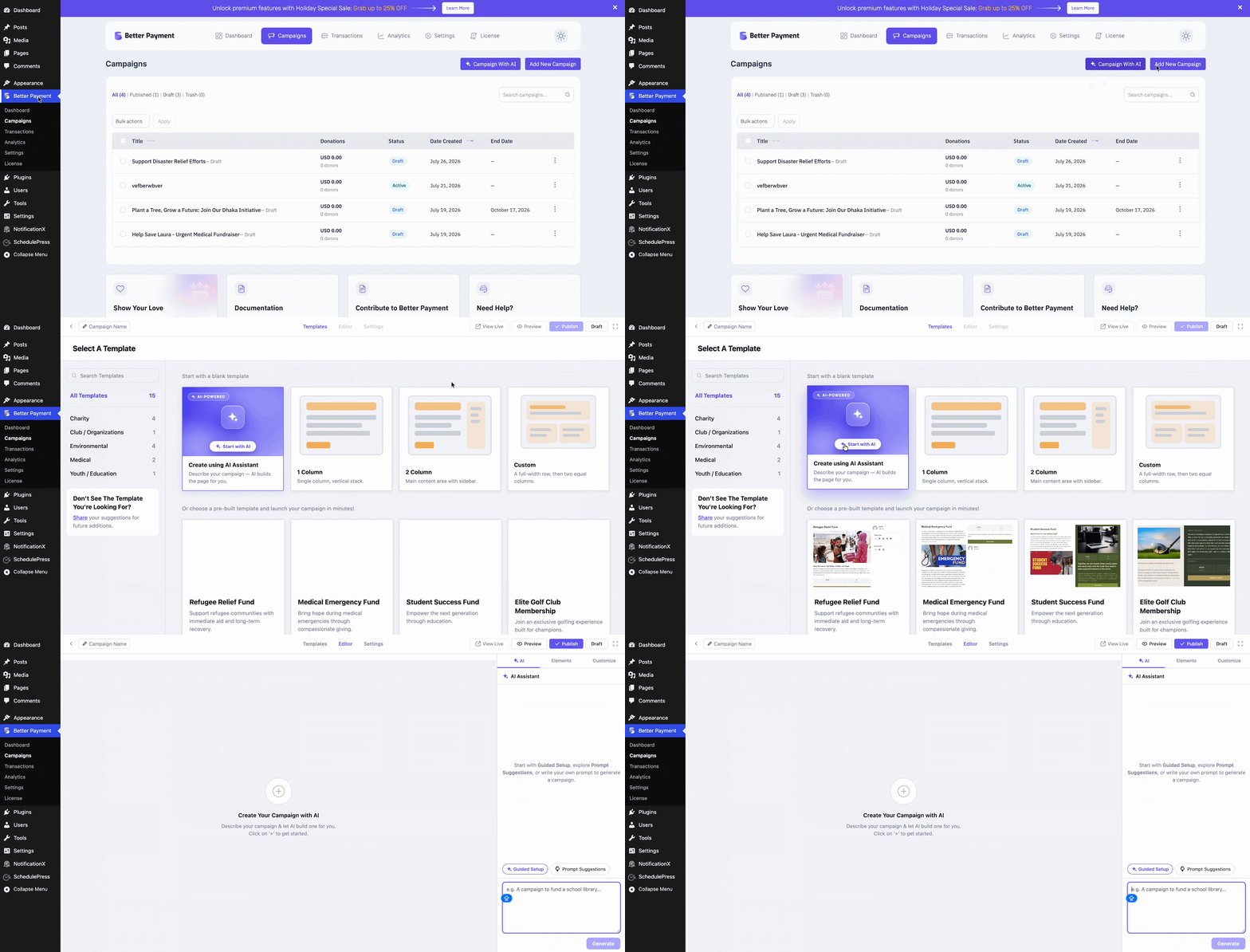
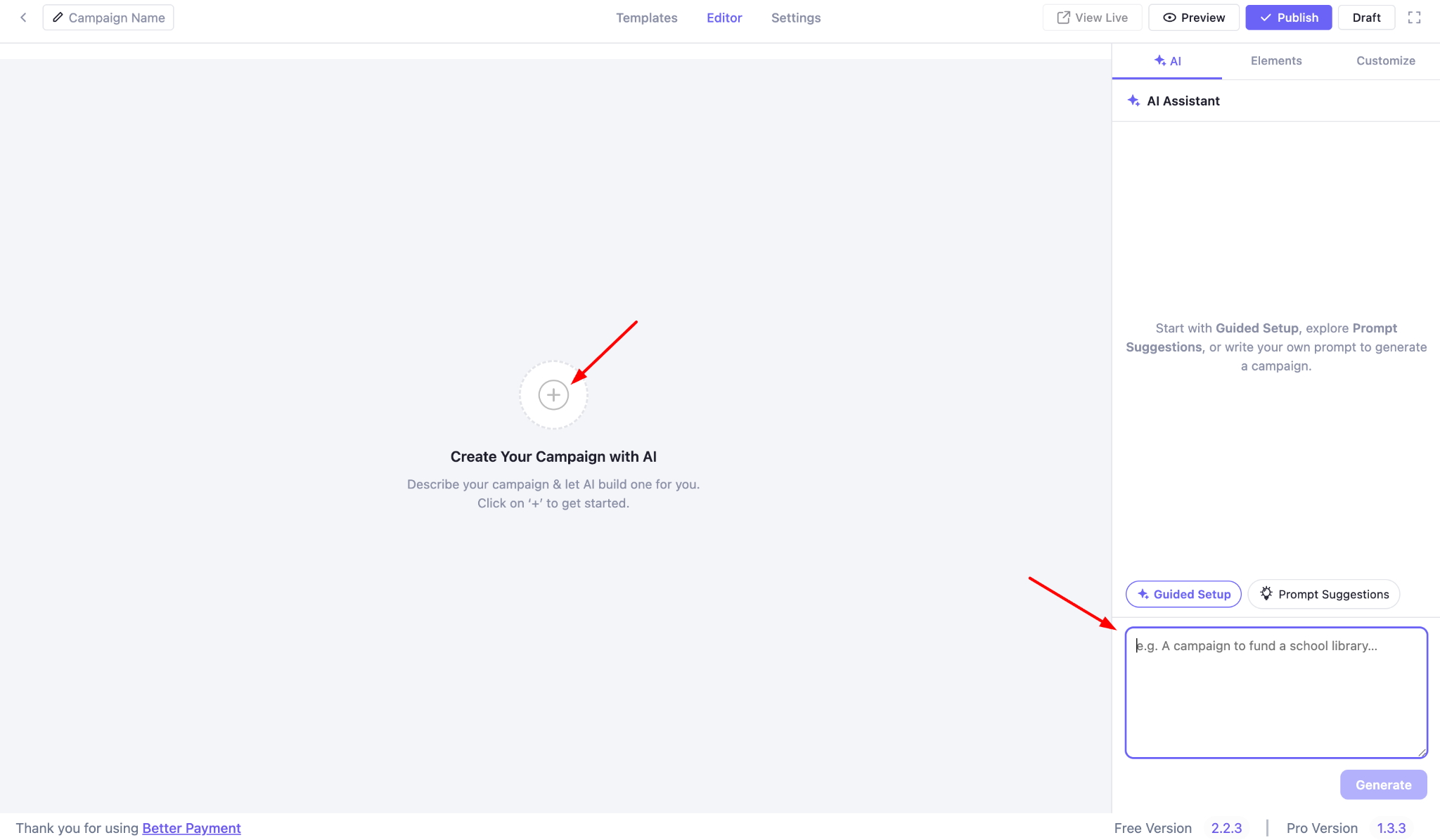
You can also go straight there through Campaigns → Campaign with AI. Click the plus icon and the AI chatbox opens, ready for your first prompt.
Three Ways to Start With AI Campaign Builder
Not everyone wants to start the same way, so the AI Campaign Builder gives you three ways in. Pick the one that matches how much direction you feel like giving.
1. Write Your Own Prompt
If you already know what you want, just type it. Describe your cause, your audience and your goal in your own words and the AI turns it into a full campaign. This is the fastest path for people who know exactly what they are raising money for.
2. Guided Setup
If you would rather be walked through it, ‘Guided Setup’ asks a few quick questions and writes the rest for you. You choose a campaign layout, such as let the AI decide, one column, two columns, or custom.
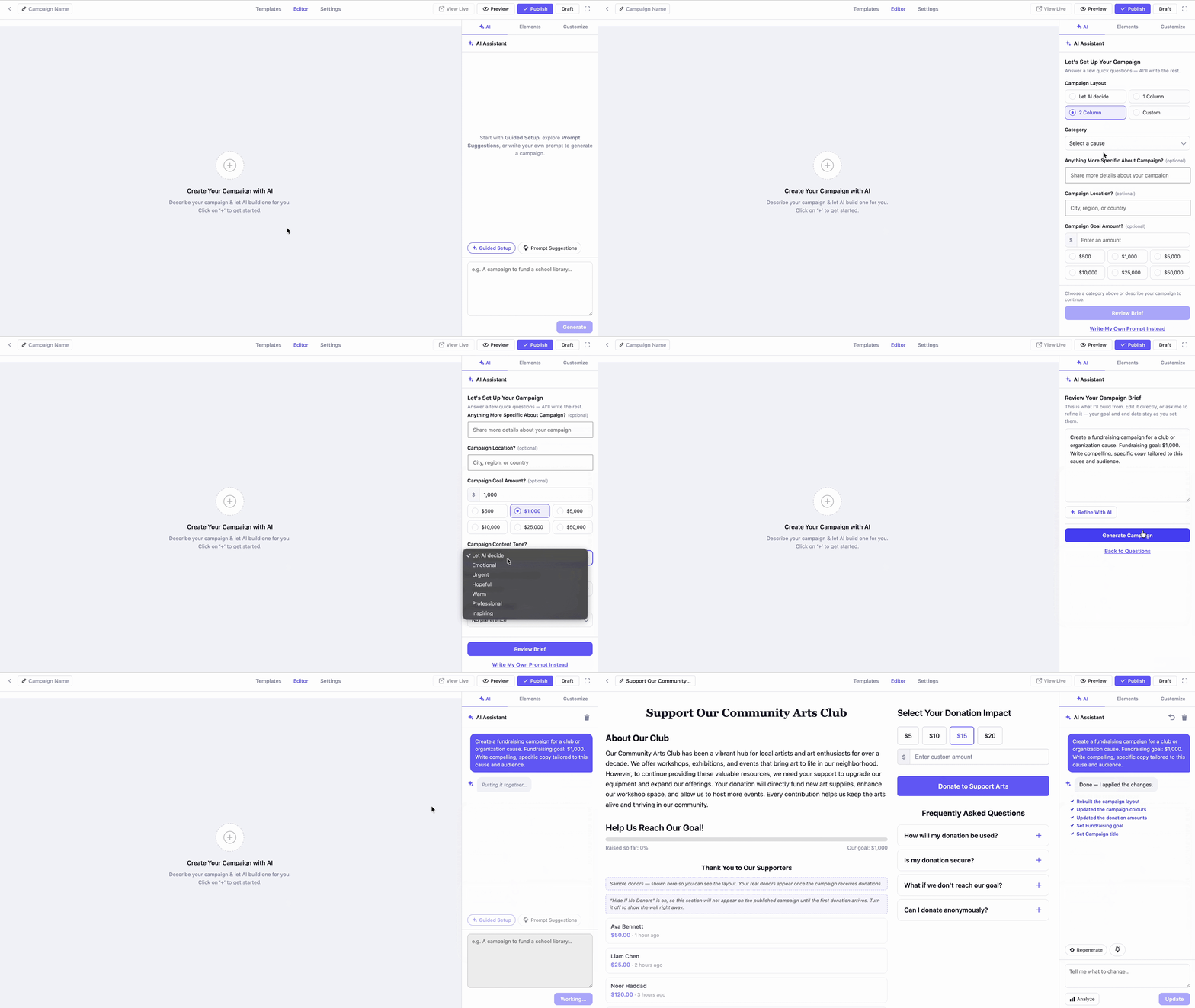
You pick a category and you can add optional details like location, goal amount, content tone and an end date. Answer what you want, skip what you do not, and let the AI handle the writing.
3. Prompt Suggestions
If you are not sure how to phrase it at all, Prompt Suggestions gives you several ready-made prompts to choose from. Pick the one closest to your campaign, edit the wording if you like and click ‘Generate Campaign’. Your campaign is built and waiting.
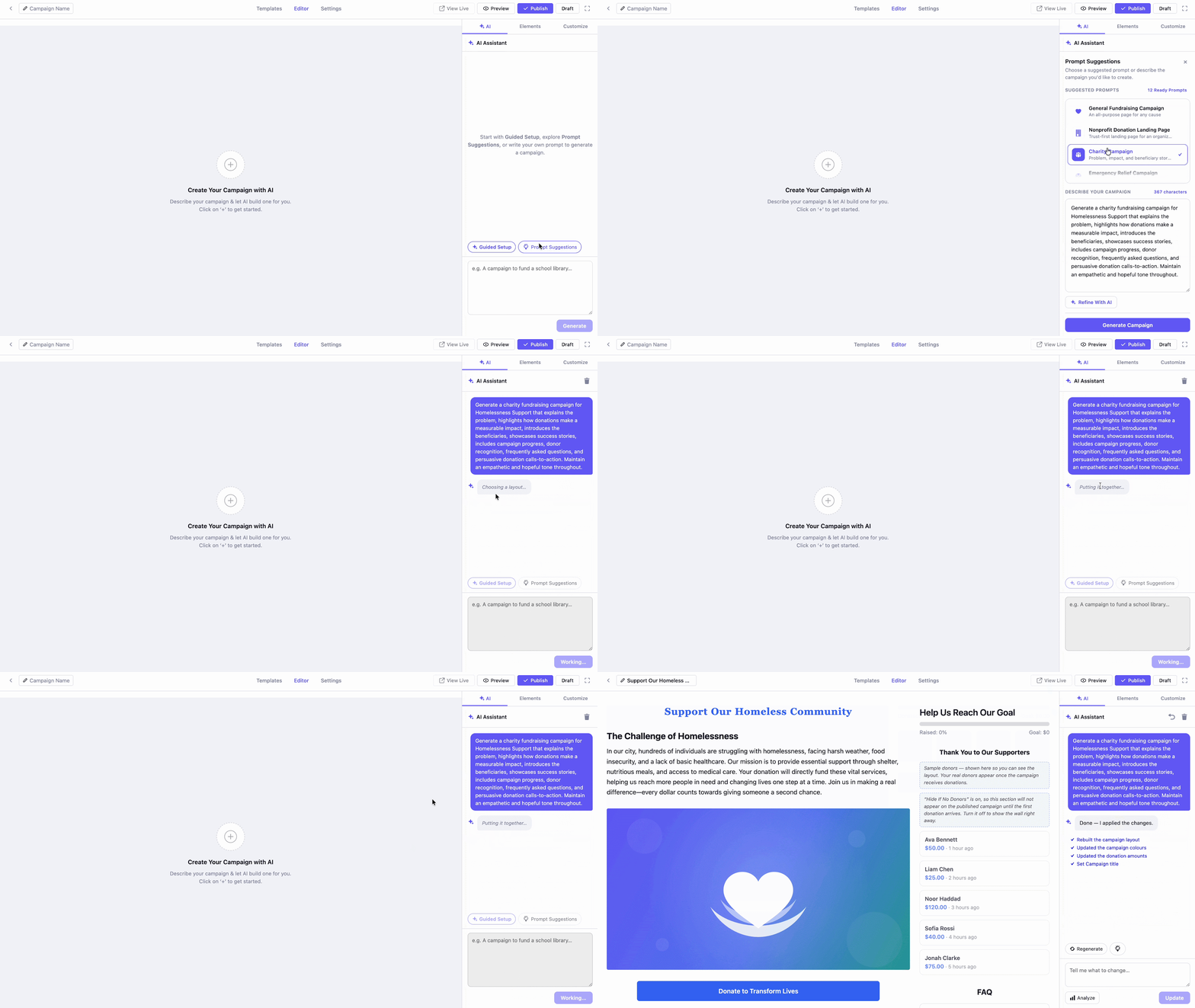
Three doors, one destination: a complete campaign you can then make your own.
Refine with AI, No Rewriting from Scratch
A first draft is a starting point, not the finished piece. The AI Campaign Builder is built for the back and forth of getting the copy right and it works at two levels.
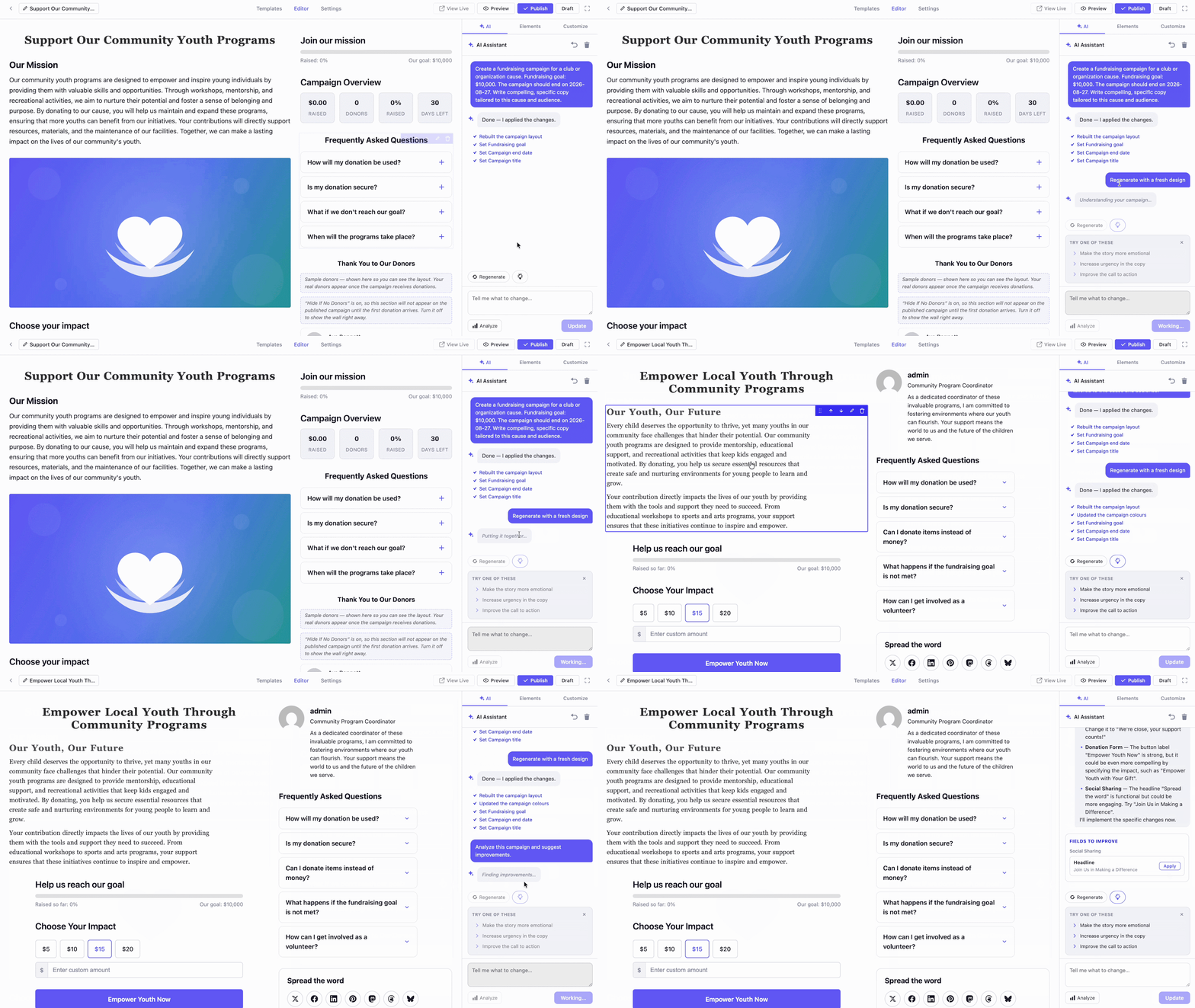
Number 1: The AI Assistant panel sits on the right of your generated campaign and improves the whole thing. If you are not happy with the result, Regenerate gives you a fresh version.
If you want ideas, the suggestions let you apply quick refinements with one click, such as making the story more emotional, increasing urgency in the copy, or improving the call to action.
You can also type your own instructions, such as shortening the intro or adding a section for volunteer opportunities and then click Update to apply them. And Analyze gives you AI feedback on your current content, so you know what is working before you publish.
Number 2: AI Quick Edit works field by field, for when the campaign is mostly right but one section needs attention. Click any field, such as the campaign description, open the Customize tab and under AI Quick Edit choose Rewrite for a fresh version, Shorten to tighten it up, Improve to raise the overall quality, or More Urgent to push readers toward faster action.
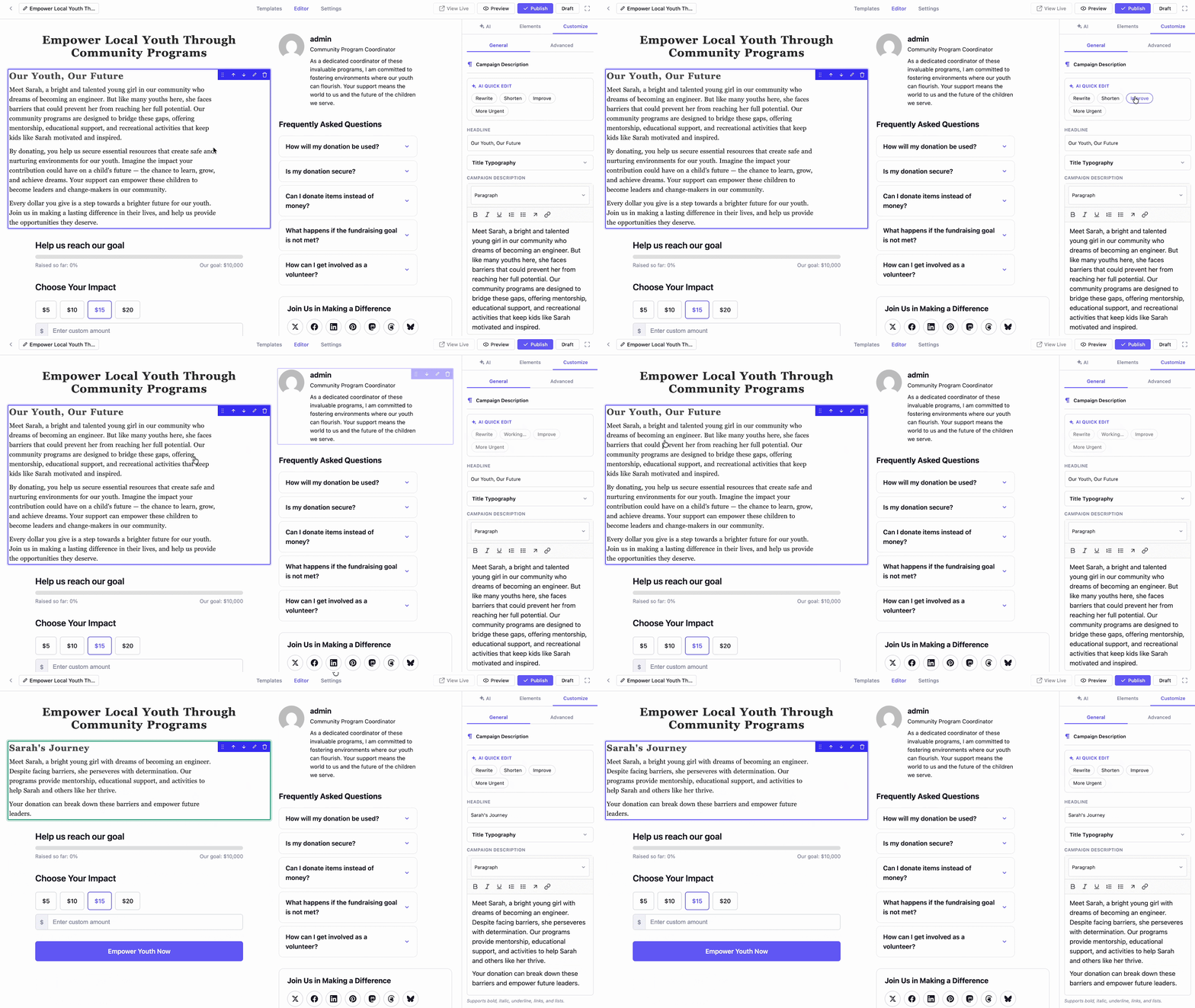
You get targeted, AI-powered edits on a single field without regenerating the whole campaign.
Preview And Publish in a Few Clicks
When the copy reads the way you want it to, the finish line is close. Click Preview to see exactly what your donors will see and when everything looks right, click Publish.
Your campaign goes live on your own WordPress site, ready to accept donations through your existing Better Payment gateway. No extra plugins, no external platforms, no handoff. Just a finished campaign, live.
Who Benefits Most from the AI Campaign Builder?
The AI Campaign Builder is built for anyone who has a cause worth funding but no copywriter on staff. Here who can benefit most from this feature:
- Nonprofits and charities running one appeal after another can create polished campaigns and pair them with the other proven ways to collect donations on WordPress.
- Community groups, schools, and churches organizing a drive can hand the writing to a volunteer, get professional copy on the first try and then reach more supporters through peer-to-peer fundraising.
- Agencies and freelancers building campaigns for several clients can cut hours of drafting down to minutes, and then refine to match each client’s voice.
If the writing has ever been the thing standing between you and a live campaign, this is for you.
Your Next Campaign Is One Prompt Away
The AI Campaign Builder solves the problem that has slowed WordPress fundraisers down for years. No more staring at a blank field. No more guessing what the headline should say. No more putting off a campaign because the writing feels like too much work. You describe your goal and the AI hands you a full campaign to refine and publish.
Three takeaways are worth holding on to:
- First, the AI Campaign Builder gives you a complete first draft in seconds, so you start from something real instead of an empty page.
- Second, you stay in full control, because you can regenerate, refine, and quick-edit every field until the copy sounds like you.
- Third, the whole thing happens on your own WordPress site, so your campaign, your donor data, and the money you raise all stay with you.
If you have found this blog helpful, share your opinion with our Facebook community. You can subscribe to our blogs for valuable tutorials, guides, knowledge, tips, and the latest WordPress updates.