Building a fundraising campaign on WordPress has always been one of the most frustrating parts of running a nonprofit, charity, or community cause. Multiple plugins to stitch together. Custom code to get the design right. A separate landing page builder. A donation form that does not match the campaign page. Donors are getting lost between the message and the moment of giving.
Most fundraisers end up giving up on WordPress and moving to external platforms like GoFundMe & more. These platforms take a percentage of every dollar raised, host the campaign on their own domain and own the donor data your organization worked hard to earn. The trade-off feels unavoidable. Either accept the platform tax or accept the complexity of building everything from scratch.
That trade-off is what we set out to fix. The new Campaign Builder in Better Payment is a purpose-built WordPress fundraising campaign builder that gives you the design flexibility of a custom-built page, the speed of a template-driven tool, and the cost economics of a plugin you already own.
This guide explains why we built Campaign Builder, what it does, who benefits most and how to launch your first campaign in under 15 minutes.
Quick Summary / TL;DR
Here is everything in 60 seconds.
- Campaign Builder is a new feature in Better Payment designed for nonprofits, charities, schools, and community causes raising funds on WordPress
- Pre-built campaign templates let you launch in minutes instead of weeks
- Drag-and-drop customization for every field, with no code required
- Visual progress bars and goal tracking create social momentum that lifts donations
- Built-in social sharing turns every donor into an amplifier of your cause
- Recurring donation options capture sustained giving, which donors give 42 percent more annually
- No platform fees on top of your payment processor. You keep what you raise.
- Full donor data ownership stays with your organization, not a third-party platform
What Is Campaign Builder in Better Payment?
Campaign Builder is a new feature inside Better Payment that lets you create dedicated fundraising campaign pages directly on your WordPress site.
Each campaign comes with its own progress bar, goal, end date, donation options, social sharing, and organizer details.
1. A Purpose-built WordPress Fundraising Campaign Builder
Campaign Builder is different from a generic donation form. A form just collects a payment. A campaign page tells a story, shows progress toward a goal and gives supporters a reason to share. Campaign Builder combines both layers in a single, customizable page that lives on your own domain.
2. How Campaign Builder Differs from Generic Donation Forms
Most WordPress donation plugins give you a payment form and stop there. You still need a separate page builder, design work and integrations to display campaign goals or share buttons. Campaign Builder bundles all of these into one workflow. The result is a campaign that looks intentional, communicates clearly, and converts.
3. Who Campaign Builder Is Built For
WordPress now powers a massive share of the websites on the internet, including thousands of nonprofit and community organizations. According to WordPress usage data from W3Techs, WordPress powers roughly 43 percent of all websites globally. Campaign Builder is for the nonprofits, schools, religious organizations and personal causes inside that 43 percent who want to keep fundraising on their own site instead of paying platform fees elsewhere.
Why We Built Campaign Builder (The Story Behind the Feature)
Three problems showed up consistently in conversations with Better Payment users running nonprofit and fundraising sites. Each one pointed to the same gap.
1. The Problem with Fundraising on WordPress in 2026
Online fundraising campaigns have become the dominant donation channel. According to nonprofit benchmark research, recurring revenue now represents nearly 30 percent of all online giving for nonprofits. Yet the tools available to WordPress users have not kept pace with the shift. Fundraisers were piecing together themes, donation form plugins, page builders and analytics tools just to launch one campaign.
2. What Existing Solutions Were Missing
We looked at the alternatives our users were turning to. Each one had trade-offs that hurt the organization.
| Platform Type | Approach | Typical Cost | Customization | Donor Data Ownership |
| External fundraising platforms | Hosted on a third-party domain | 2.9% + $0.30 + 3 to 7% platform fee | Limited templates only | Platform owns |
| Generic WordPress donation plugins | Basic form on your site | Plugin license | Form fields only, no campaign page | You own |
| Custom development | Build from scratch | $2,000 to $10,000+ | Unlimited | You own |
| Campaign Builder | Built into your WordPress site | Plugin license only | Full visual builder | You own |
The pattern was clear. External platforms were easy to launch but expensive and disconnected from your brand. Custom development gave full control, but cost too much for most small nonprofits. Existing WordPress plugins were affordable but lacked the campaign layer entirely.
3. Our Design Philosophy: Simple, Flexible, Conversion-focused
We built Campaign Builder around three principles. Simple enough that a volunteer can launch a campaign without training. Flexible enough that an experienced WordPress user can customize every element. Conversion-focused enough that the default templates already include the progress bars, donation buttons and social sharing features that move donors to act.
What Are the Key Features of Campaign Builder?
Each feature was designed around a specific donor or organizer need. Here are the four that matter most.
1. Pre-built Fundraising Campaign Templates
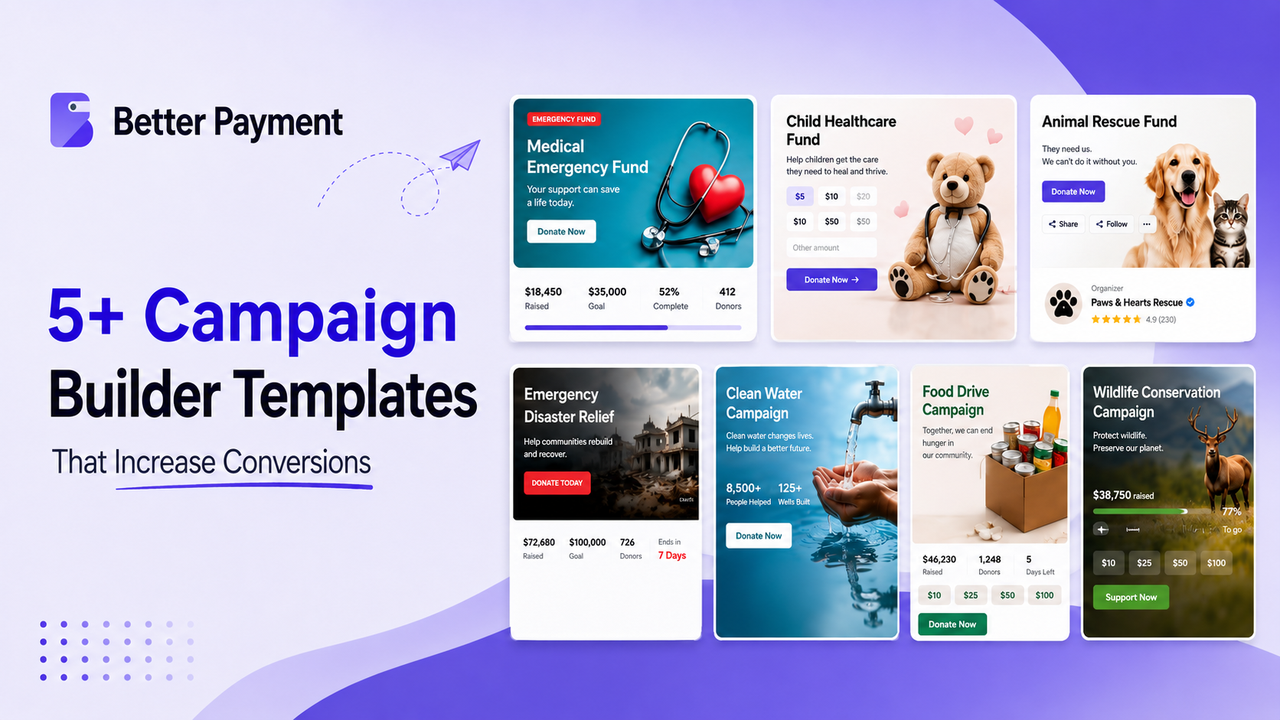
You start with a template, not a blank page. Templates cover common campaign types, including environmental causes, community projects, emergency relief and personal fundraisers. Each template is fully editable. You can preview any template before committing, which removes the risk of starting from scratch and getting stuck halfway through.
2. Drag-And-Drop Customization for Every Field
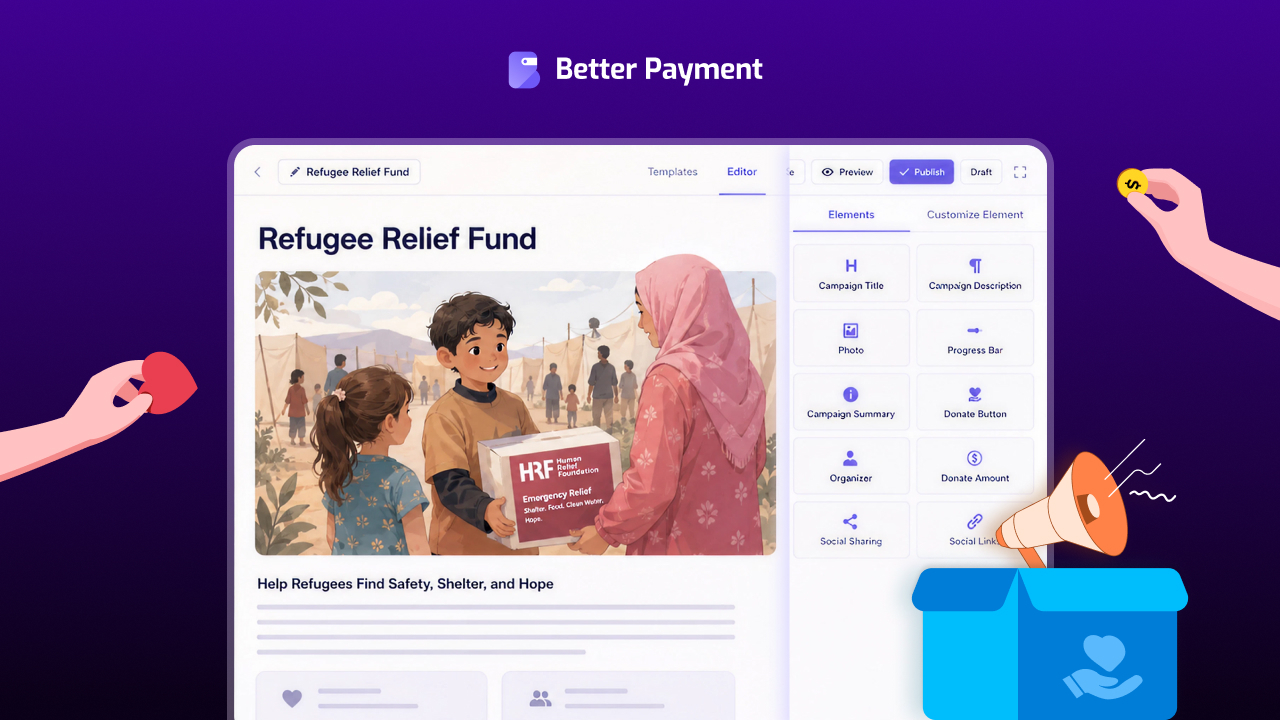
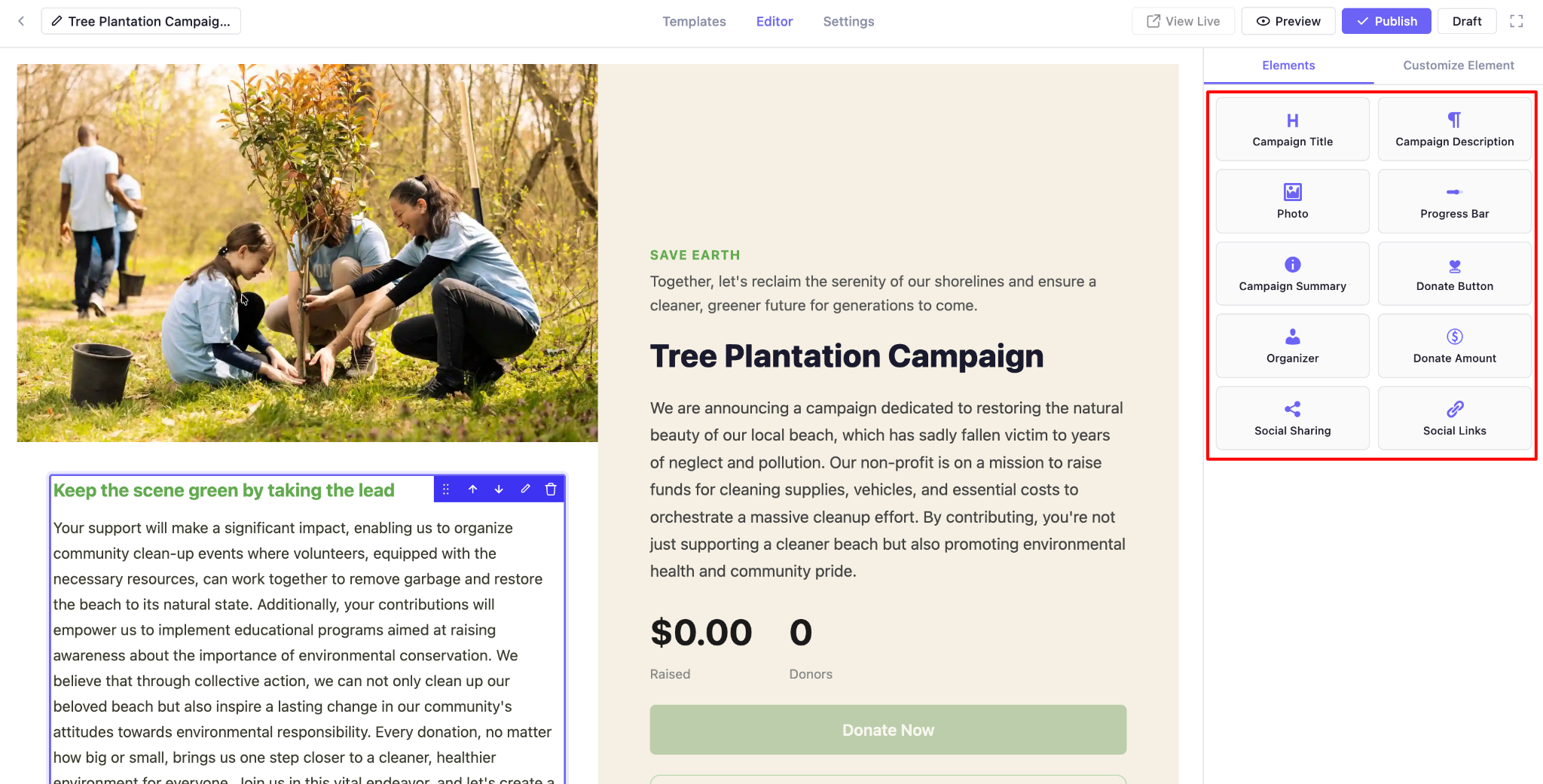
Once a template is loaded, you can customize every field directly in the editor. Click on a headline to change it. Click on the photo to replace it. Drag new fields onto the page from the campaign field library, which includes campaign title, description, photo, progress bar, summary, donate button, donate amount, organizer, social sharing and social links.
3. Goal Tracking And Visual Progress Bars
Every campaign includes a visual progress bar that updates as donations come in. This is one of the highest-leverage conversion features in modern fundraising. Watching a campaign approach its goal creates a sense of social momentum that motivates new donors to push it over the line. The visual feedback is small but powerful, and it works on every device.
4. Flexible Donation Amounts And Recurring Giving Options
From the Settings tab, you can configure preset donation amounts, allow custom amounts, set minimums, and enable recurring giving. According to the research, recurring donors give an average of 42 percent more annually than one-time donors. Making recurring giving a one-click option at the point of donation automatically captures this lift.
How to Create Your First Campaign in 4 Steps
The full workflow is covered in the step-by-step Campaign Builder documentation. Here is the high-level path.
Step 1: Add a New Campaign from Your Better Payment Dashboard
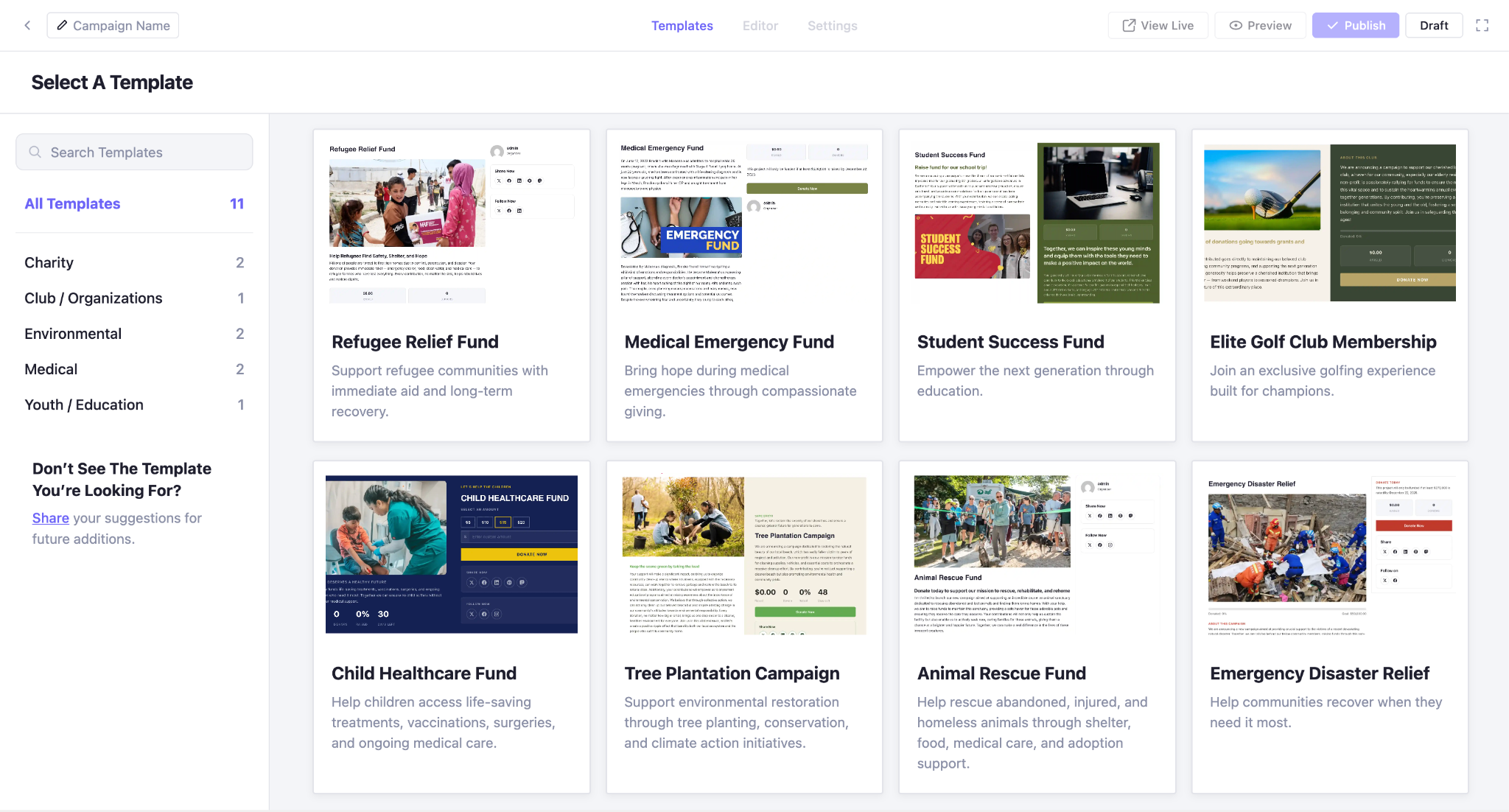
Navigate to Better Payment, click Campaigns, then click Add New Campaign. You will be taken directly to the templates page. No code. No additional plugins. No external service signups.
Step 2: Choose a Template (or Start Blank)
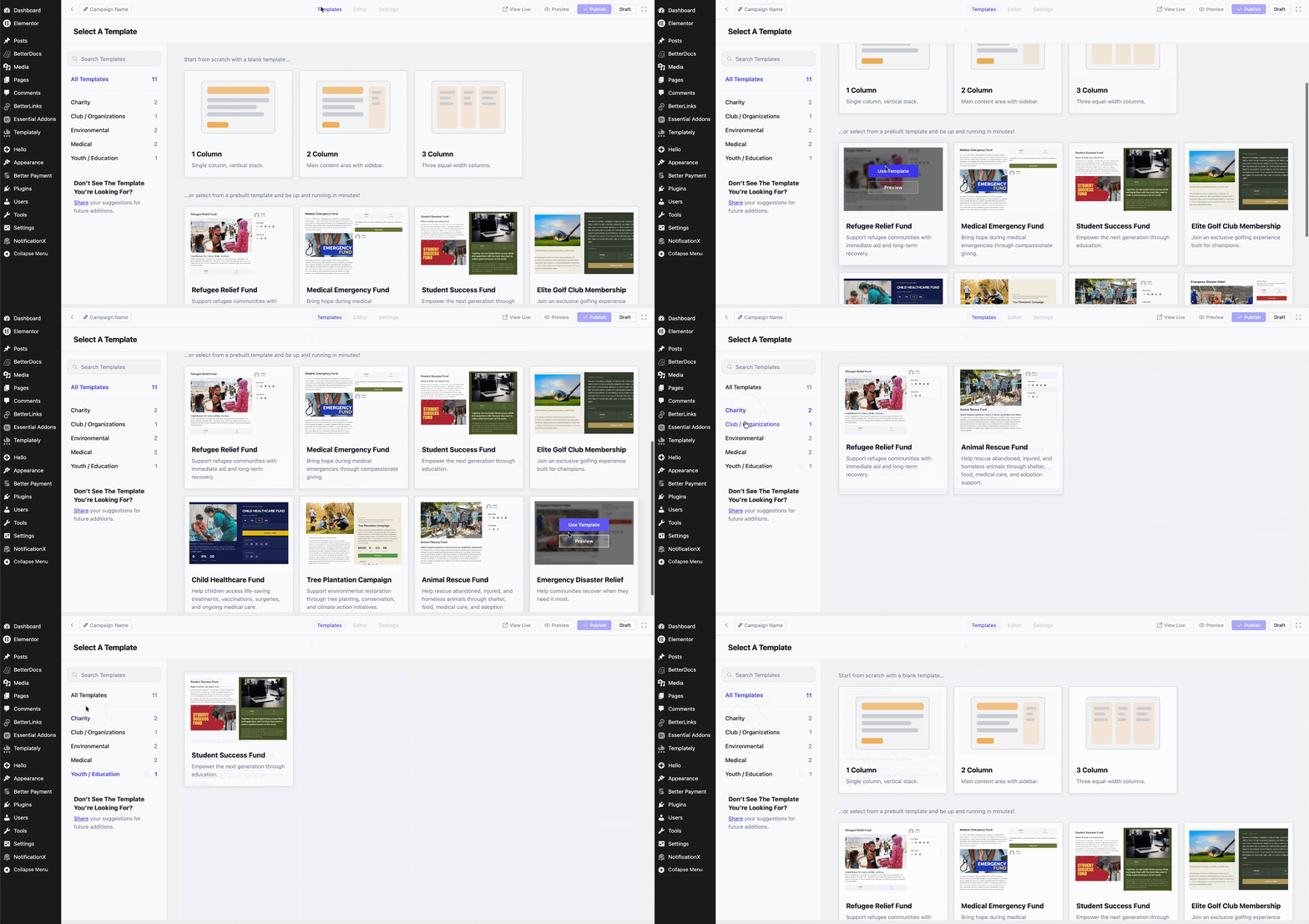
Pick from the prebuilt templates designed for different campaign types. Hover any template to preview and click Use This Template when you find one that fits. If you want full creative control from the start, the blank template option gives you an empty canvas to build on.
Step 3: Customize Content, Design And Settings
Once your template loads in the editor, customize each field by clicking on it. The Customize Element panel on the right gives you full control over text, colors, sizes, and layout.
From the Settings tab, set your campaign goal, end date, donation options and recurring giving preferences. The drag-and-drop interface means anyone on your team can do this, not just developers.
Step 4: Preview And Publish
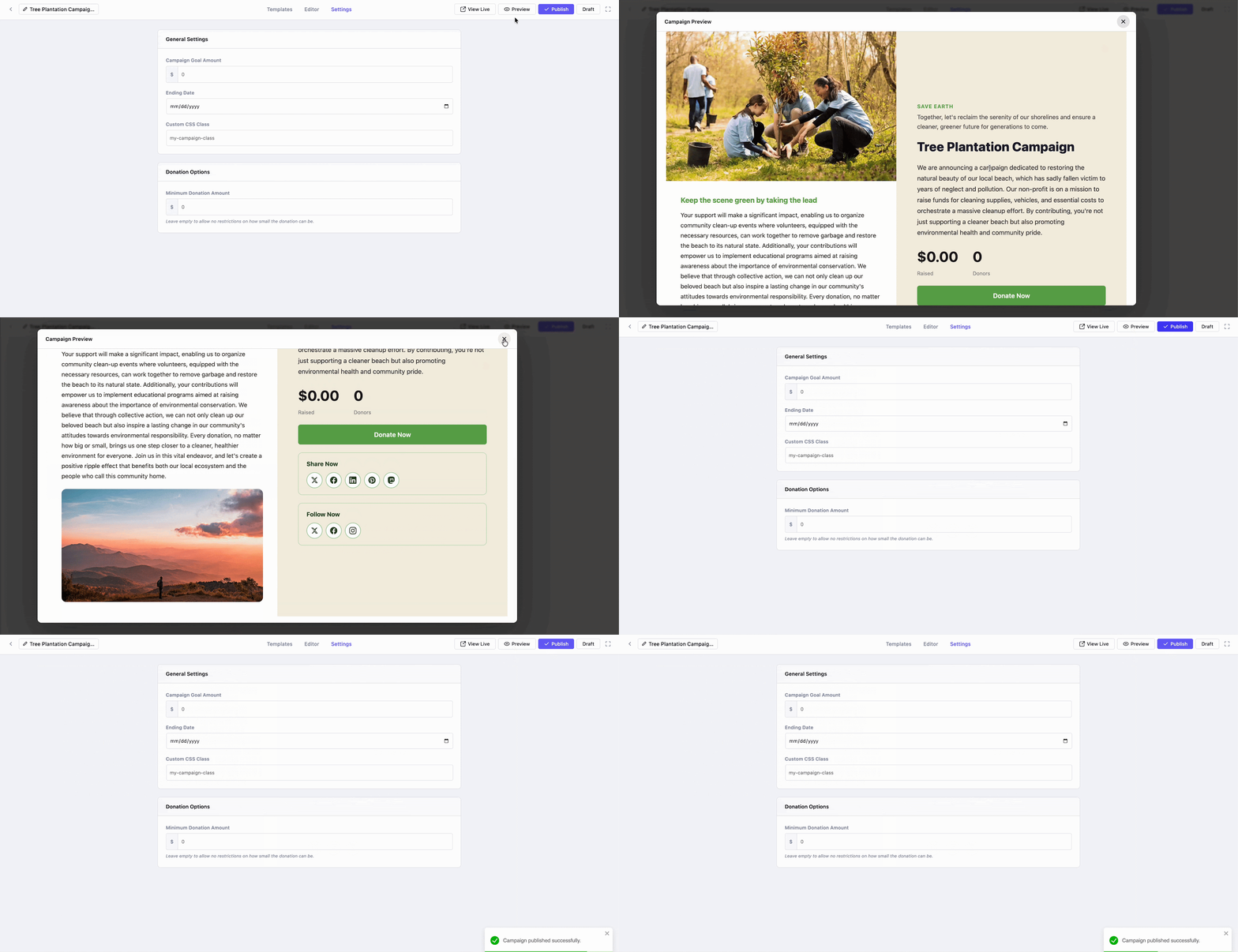
Click Preview to see exactly what donors will see. If everything looks right, click Publish. Your campaign is now live on your WordPress site, ready to accept donations through your existing Better Payment payment gateway.
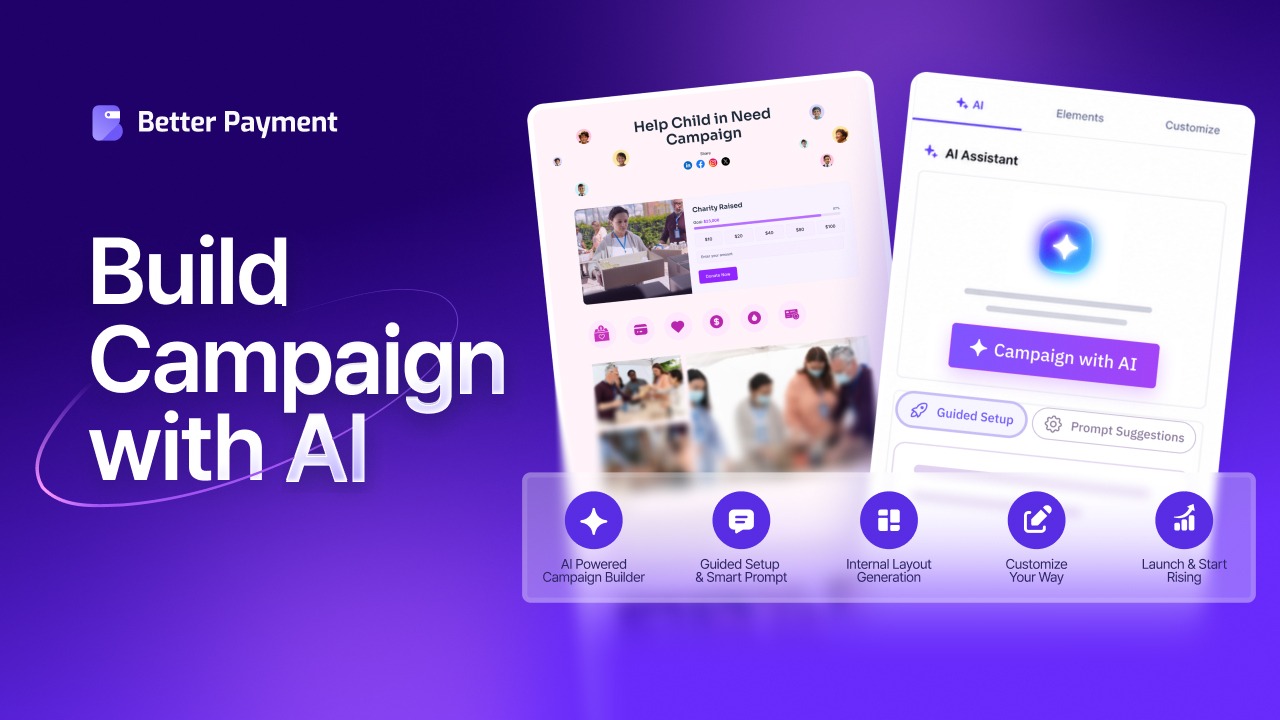
👉 Learn more: Introducing AI Campaign Builder in Better Payment: Let’s Create Campaigns in Minutes
Who Benefits Most from Campaign Builder?
Campaign Builder serves a wide range of organizations, but four groups see the biggest impact.
1. Nonprofits And Registered Charities
Larger nonprofits running annual fundraising drives, capital campaigns, or themed appeals get the most direct value. ‘Campaign Builder’ lets you launch multiple concurrent campaigns from one WordPress site with no extra plugins or platform fees.
2. Schools, Churches And Community Organizations
Schools running PTA fundraisers, churches raising funds for a building project and community groups organizing benefit campaigns all benefit. The template library covers these use cases out of the box, and the customization flexibility means each campaign feels distinct.
3. Personal Causes And Crowdfunding Campaigns
For individuals raising funds for medical expenses, memorial funds, or personal goals, ‘Campaign Builder’ offers a way to run a campaign on your own site. No more giving up a percentage to GoFundMe or other external platforms to do so.
4. Memorial Funds And Disaster Relief Efforts
Time-sensitive campaigns need to launch fast. Pre-built templates and the 4-step workflow mean a disaster relief campaign can go live the same day the need arises, with full progress tracking and social sharing built in from the start.
How Does Campaign Builder Help You Raise More Donations?
Beyond the workflow simplification, ‘Campaign Builder’ includes specific design choices that lift donation rates.
1. Visual Progress Bars Create Social Momentum
Donors who see a campaign at 70 percent of its goal are more likely to give than donors who see no progress information at all. The visual nudge of a near-complete progress bar triggers the social proof and momentum effects that Network for Good and other fundraising researchers have documented for decades.
2. Templates Reduce Launch Friction from Weeks to Minutes
The single biggest reason campaigns fail to launch is friction in the build process. Templates remove that friction. A campaign that takes 15 minutes to set up gets launched. A campaign that takes 3 weeks of design work often does not. The math of fundraising favors more campaigns, more frequently, with less effort per launch.
3. Built-in Social Sharing Turns Donors into Amplifiers
Every campaign includes social sharing buttons and links by default. When donors share a campaign they just supported, their social network sees endorsement from someone they trust. According to online giving statistics compiled by Nonprofits Source, peer-to-peer sharing remains one of the most cost-effective channels in nonprofit fundraising, and it happens automatically with built-in sharing.
4. Recurring Donation Options for Sustained Giving
The recurring giving toggle is the single most undervalued feature in online fundraising. Organizations that make recurring giving a default option capture significantly more annual revenue per donor than those that treat it as an afterthought.
Frequently Asked Questions (FAQs)
What is Campaign Builder in Better Payment?
Do I need any coding skills to use Campaign Builder?
Can I run multiple campaigns at the same time?
Does Better Payment Campaign Builder charge platform fees?
Can donors set up recurring donations through Campaign Builder?
What types of organizations are best suited for Campaign Builder?
Build Your Campaign The Way You Want from Scratch
Campaign Builder solves the problem WordPress fundraisers have been working around for years. No more piecing together donation forms, page builders and tracking tools. No more paying platform fees on every dollar raised. No more disconnect between your campaign page and the donation experience.
Three takeaways are worth holding on to. First, Campaign Builder gives you the speed of a template-driven tool combined with the flexibility of a custom build. Second, the visual elements that lift donations (progress bars, social sharing, recurring options) are built in by default. Third, your organization keeps full ownership of your campaigns, your donor data, and the revenue you raise.
If you are ready to launch your first campaign, the comprehensive Better Payment documentation walks you through every step. For more fundraising and payment optimization guides, the Better Payment blog covers what works in real campaigns.