Creating a seamless checkout process should not require a massive eCommerce setup or clunky shortcodes. Yet, for users building with the native block editor, processing simple transactions often means relying on bloated add-ons or external redirects. We believe securing your revenue stream should be effortless.
Today, we are eliminating those technical hurdles with Better Payment. You can now build a fully functional Gutenberg payment form natively, keeping the process straightforward and entirely under your visual control.
Whether you are collecting charity donations, selling digital assets or accepting client invoices, a frictionless checkout is crucial. With this WordPress payment form, you no longer have to wrestle with dense configurations or abandon your preferred editor. You can now design the exact experience you envision, ensuring a secure and professional transaction process right within the WordPress default editor.
Seamless Online Transactions: A Key Driver of Conversion Rate Optimization
Every time a potential customer or donor clicks a “Buy Now” or “Donate” button, they enter a critical phase of the user journey. The checkout process is the moment of truth. If the transition from browsing to paying is clunky, slow or visually cluttered from the rest of your website, trust diminishes rapidly. In the world of digital commerce, friction is the ultimate enemy of conversion.
When you collect payments in WordPress, the payment gateway should feel like a natural extension of your brand, not an afterthought embedded onto a page. Users expect a smooth, secure and modern interface.
If they are redirected to a poorly formatted external page or if the form fields are difficult to navigate on a mobile device, cart abandonment rates spike. But a seamless transaction builds confidence, reassures the user that their financial data is secure and dramatically increases the chance of a completed purchase.
To achieve this, site owners need tools that allow them to control every visual and functional aspect of the checkout. A reliable WordPress payment plugin must do more than just process credit cards.
It needs to empower the website owner to design an experience that matches their specific audience’s expectations. This means having control over the typography, the layout of the fields and the precise messaging displayed before, during and after a transaction.
How WordPress Payment Systems Work (Common Challenges to Watch Out For)
Historically, integrating financial transactions into a website required significant technical overhead. If you wanted to collect payments in WordPress, the standard advice was often to install a comprehensive eCommerce platform.
While powerful platforms like WooCommerce are excellent for managing large inventories and complex shipping logistics, they are completely excessive for websites that simply need to process a standard transaction or accept a donation.
This leaves site owners wrestling with a few common problems, such as:
- Unnecessary Website Bloat: Installing a heavy eCommerce architecture just to place a simple checkout button slows down your site speed and complicates your backend management.
- Complex Gateway Connections: Establishing a reliable Stripe and PayPal integration often requires writing custom API connections or navigating dense developer documentation, rather than simply entering your credentials to start accepting funds.
- Design and Styling Limitations: While generic form builders can sometimes handle transactions, they lack dedicated financial features. Furthermore, ensuring these forms look professional and responsive across all devices requires a deep understanding of CSS, leaving many dependent on costly developers.
Better Payment: WordPress Payment Plugin for Smooth Checkout Experience
To address these common frustrations, Better Payment was developed as a lightweight and highly effective WordPress payment plugin. Our philosophy is to remove the technical barriers associated with online transactions for site owners to focus on their business rather than troubleshooting payment gateways.
From the beginning, Better Payment gained immense popularity as a robust Elementor payment widget. Thousands of users have relied on its seamless compatibility to design highly converting checkout pages without touching a single line of code. By dragging and dropping the widget, you can instantly deploy beautiful layouts for single payments, recurring subscriptions and donation amounts.
The success of the Elementor payment widget proved that WordPress users value powerful functionality combined with visual simplicity. They want an effortless Stripe and PayPal integration that works out of the box, professional automated email receipts and a dashboard tracking every transaction. Better Payment delivers all of this, proving you do not need a massive eCommerce setup to effectively monetize a website.
Introducing the New Gutenberg Payment Form Block
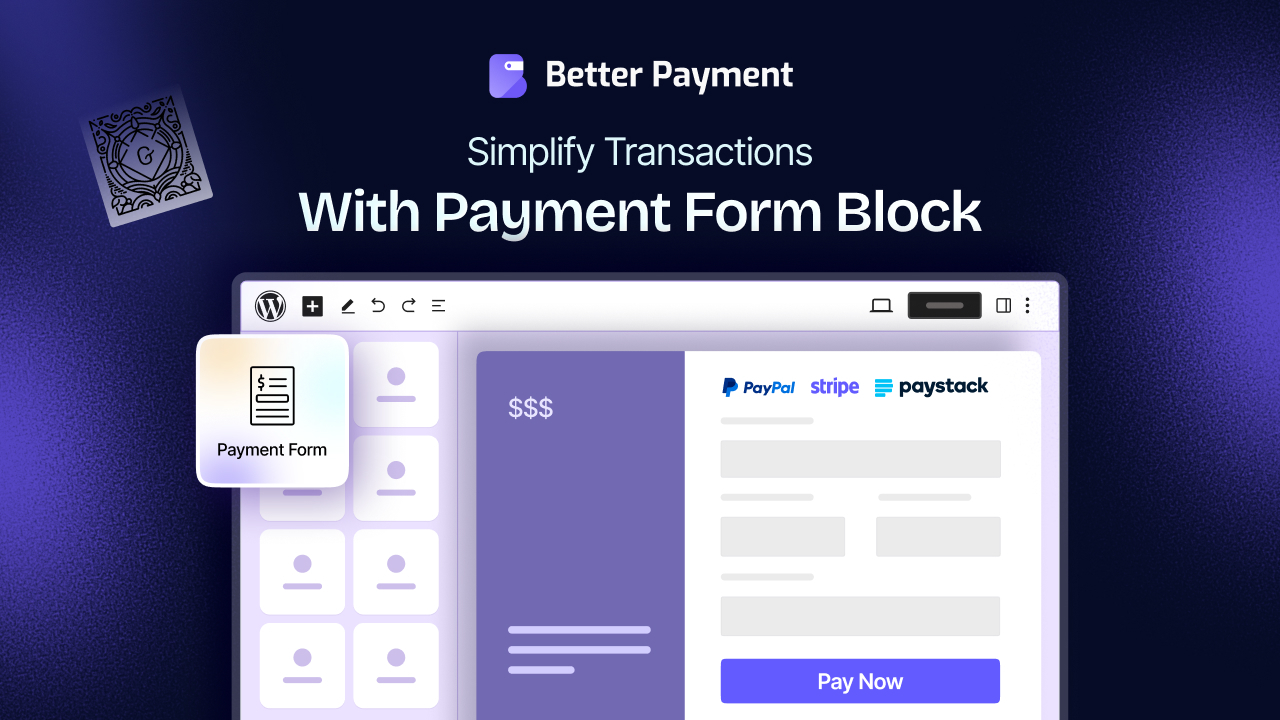
While many love designing with Elementor, a growing segment of WordPress users prefers the native block editor. And, you should never have to compromise on functionality. That is why we are thrilled to introduce our new block, allowing you to build a powerful Gutenberg payment form natively. This brings the exact same power, flexibility and design options you expect from Better Payment directly into the default editor.
You no longer need to switch editors or rely on shortcodes to embed checkouts. By utilizing the Gutenberg payment form, your checkout loads quickly, perfectly matches your theme and provides a smooth user experience. Whether you are creating a dedicated donation page or adding a quick checkout option to a post, this new block provides absolute control.
How to Configure the Gutenberg Payment Form with Better Payment
Setting up your first native checkout is a streamlined process. If you want to efficiently collect payments in WordPress, follow this comprehensive guide to configure and style your new block. Before you begin, ensure that you have installed and activated the Better Payment plugin on your website.
Step 1: Add the Block to Your Page
First, navigate to your WordPress dashboard and open the specific page or post where you want your checkout to live. Click the standard block insertion tool and search for the ‘Payment Form’ block provided by Better Payment.
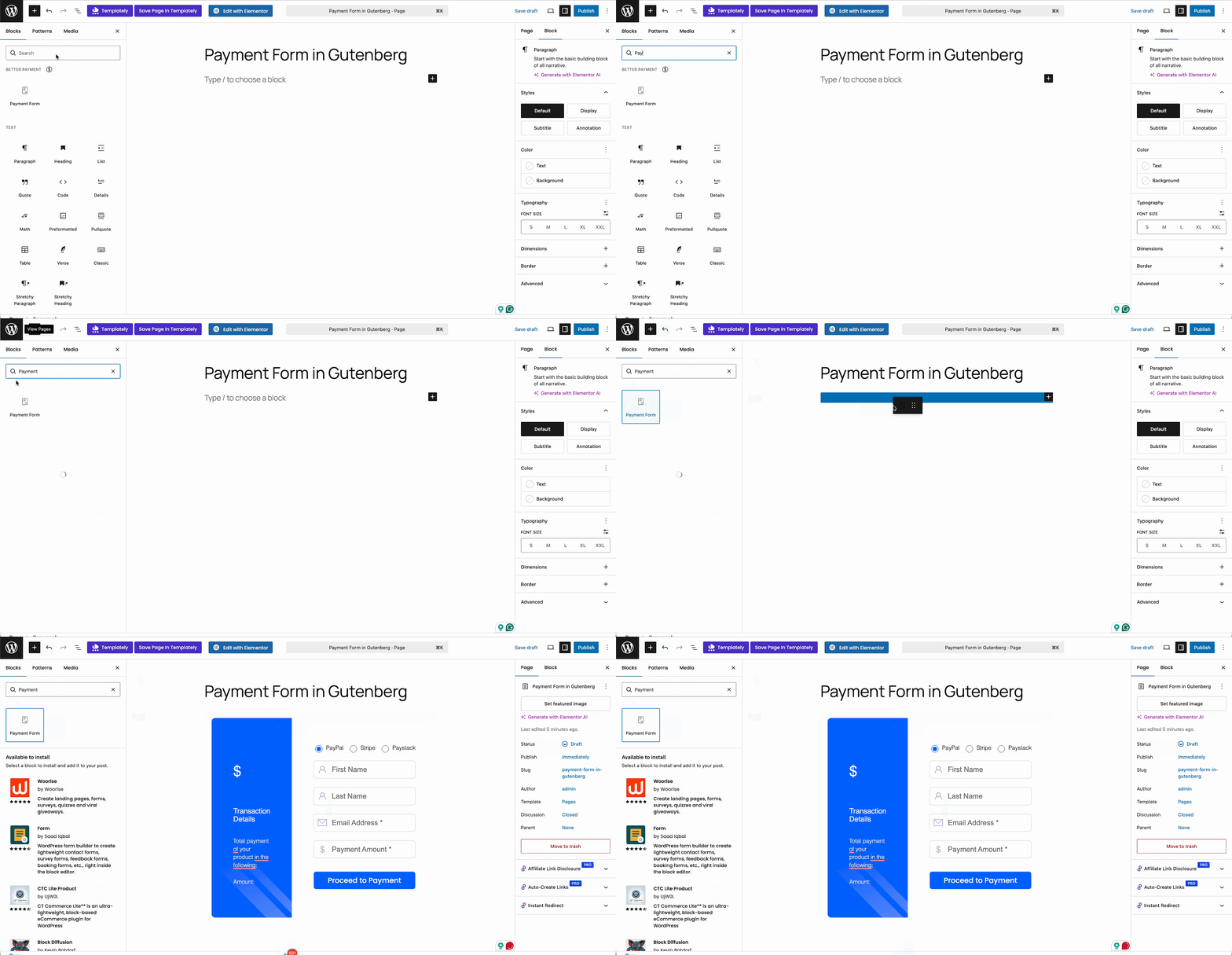
Simply drag and drop this block onto your preferred page section. The basic structure of your Gutenberg payment form will instantly appear on your screen, ready for customization.
Step 2: Adjust Your Payment Settings
Once the block is on your page, look at the block settings sidebar. Better Payment provides three distinct Layout Options for your Gutenberg payment form, allowing you to choose a visual structure that best fits your design needs. Within the Payment Settings tab, you can enable your preferred gateways with a single toggle.
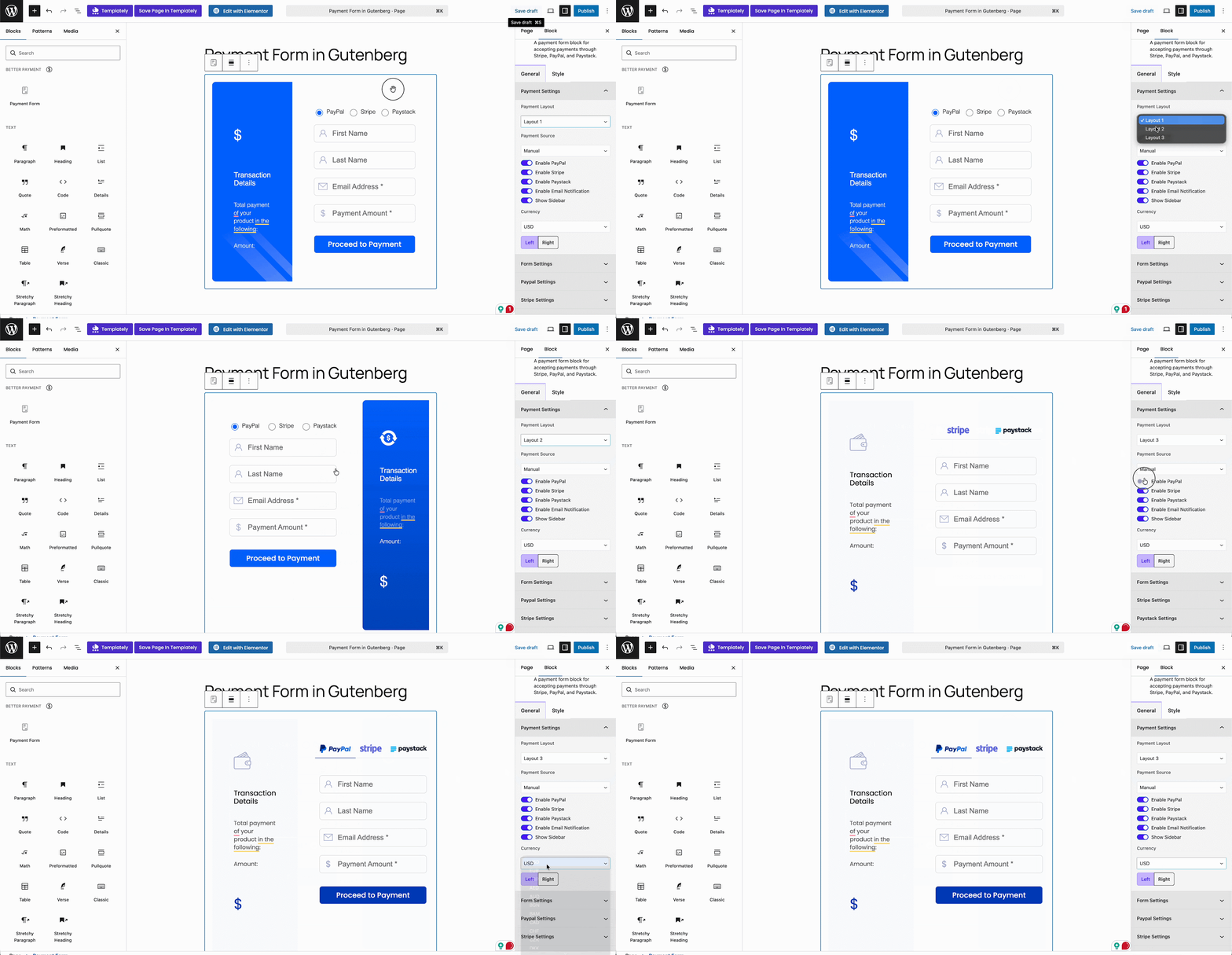
This is where you activate your Stripe and PayPal integration, alongside Paystack, providing your customers with multiple trusted ways to pay. You can also define your base currency and adjust the overall alignment of the block from this menu to ensure it sits perfectly on the page.
Step 3: Customize the Form Settings
A high-converting Gutenberg payment form must clearly communicate what the user is paying for. By navigating to the ‘Form Settings’ section, you can deeply customize the individual fields. You have the freedom to change the form field names, adjust the input types and modify the icons associated with each field.
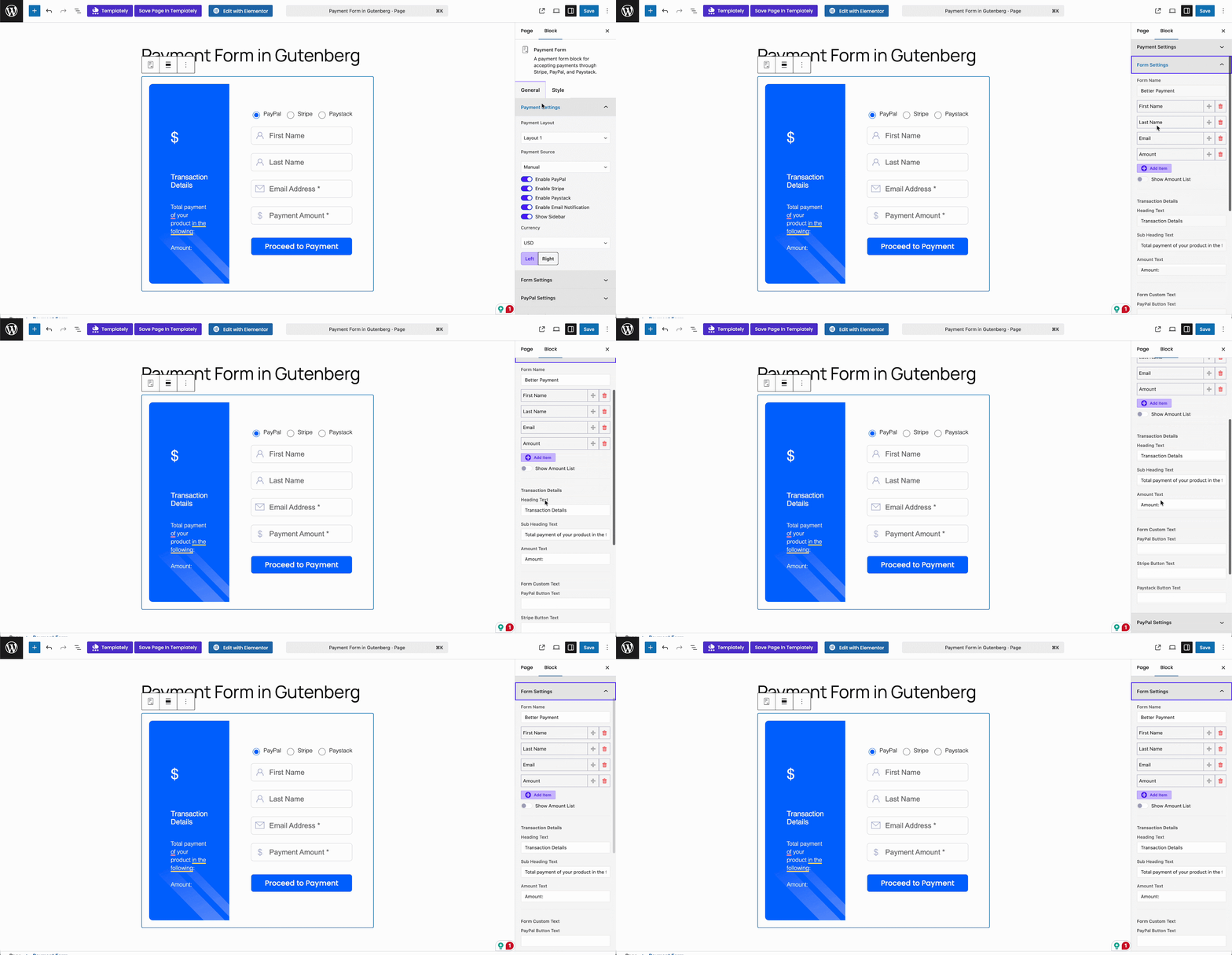
This flexibility ensures your checkout is visually appealing and highly intuitive, guiding the customer smoothly through the necessary inputs without any confusion.
Step 4: Configure Payment Method Credentials
To process live transactions securely, you need to connect your gateways. In the sidebar, expand the sections labeled ‘PayPal‘, ‘Stripe‘ and ‘Paystack‘. Here, you will input your specific API credentials, such as the public key, secret key and business email ID associated with your merchant accounts.
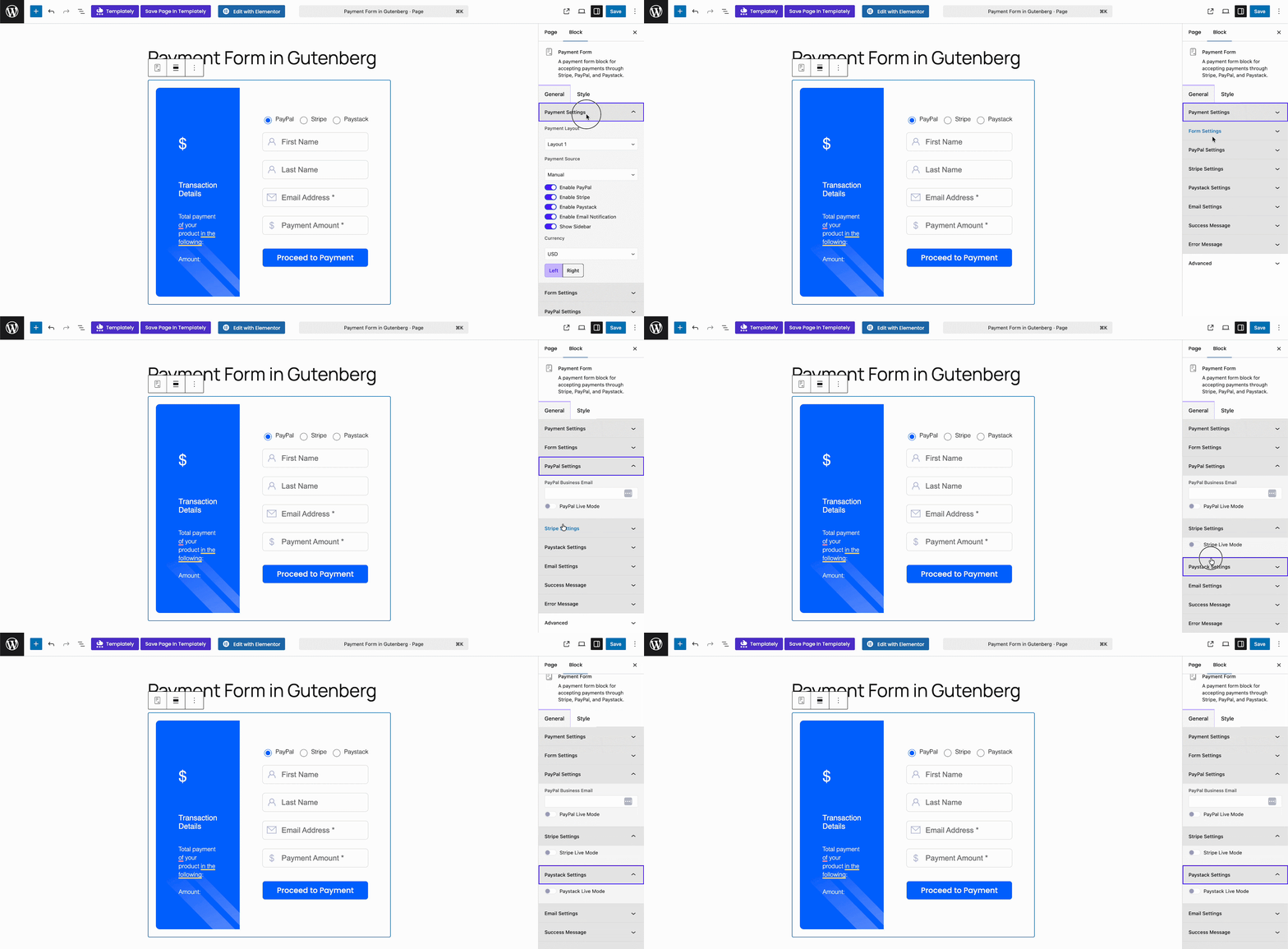
Once these details are securely entered, you can toggle the live button to transition your Gutenberg payment form from test mode to accepting real funds from your customers.
Step 5: Set Up Automated Email Notifications
Professional communication after a purchase is vital for maintaining customer trust. Under the ‘Email Settings’ section, Better Payment allows you to configure automated notifications for both the site administrators and the customers.
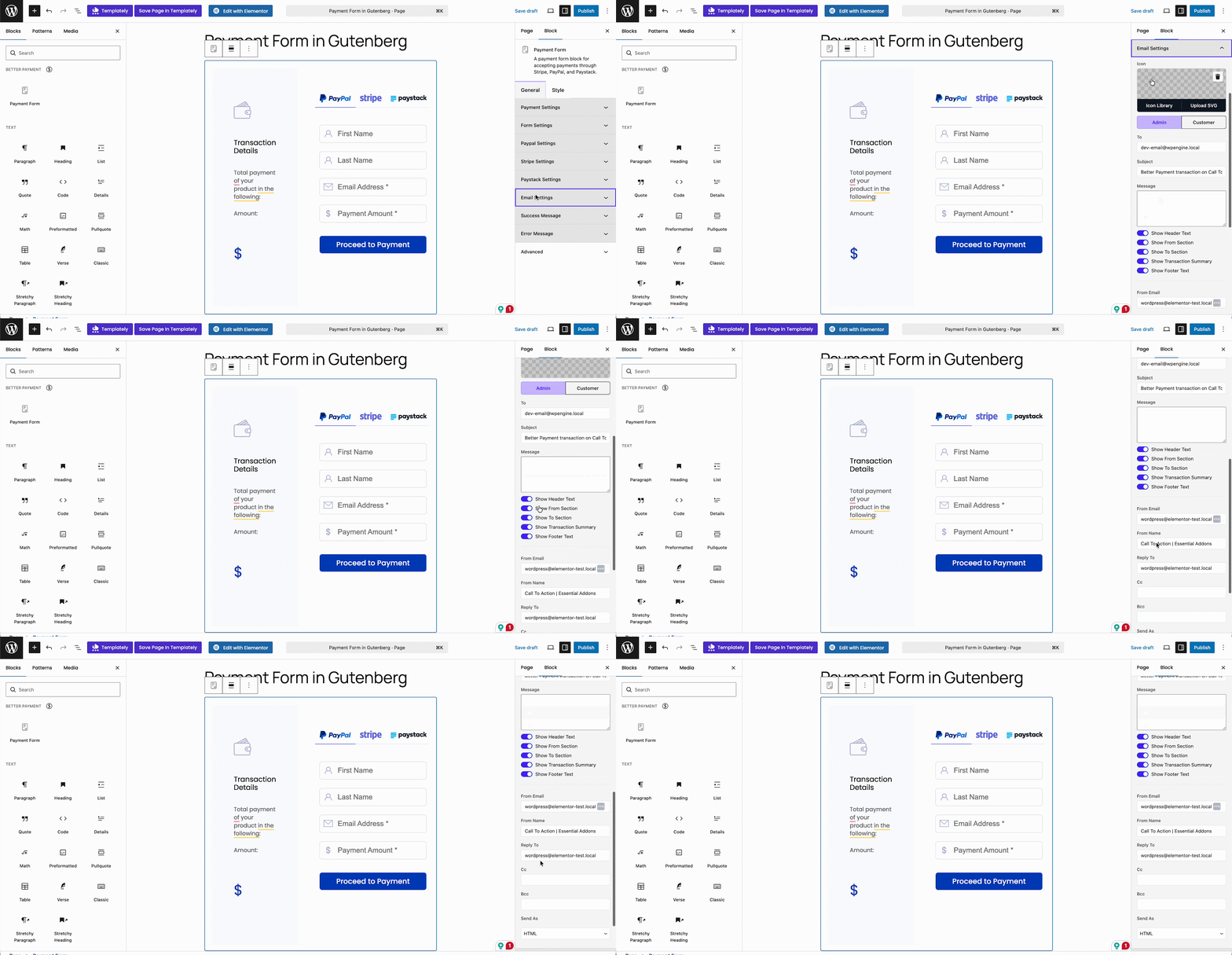
You can draft a generic subject line, write a custom message confirming the transaction and specify the sender’s email name and address. You also have the option to include CC and BCC addresses for internal administrative tracking.
Step 6: Refine the Success and Error Messages
Providing clear feedback immediately after a transaction attempt is a crucial user experience principle. If a payment goes through successfully, you want to display a welcoming confirmation. From the ‘Success Message’ panel, you can adjust the icon style, the typography of the heading and the overall look of the thank-you message.
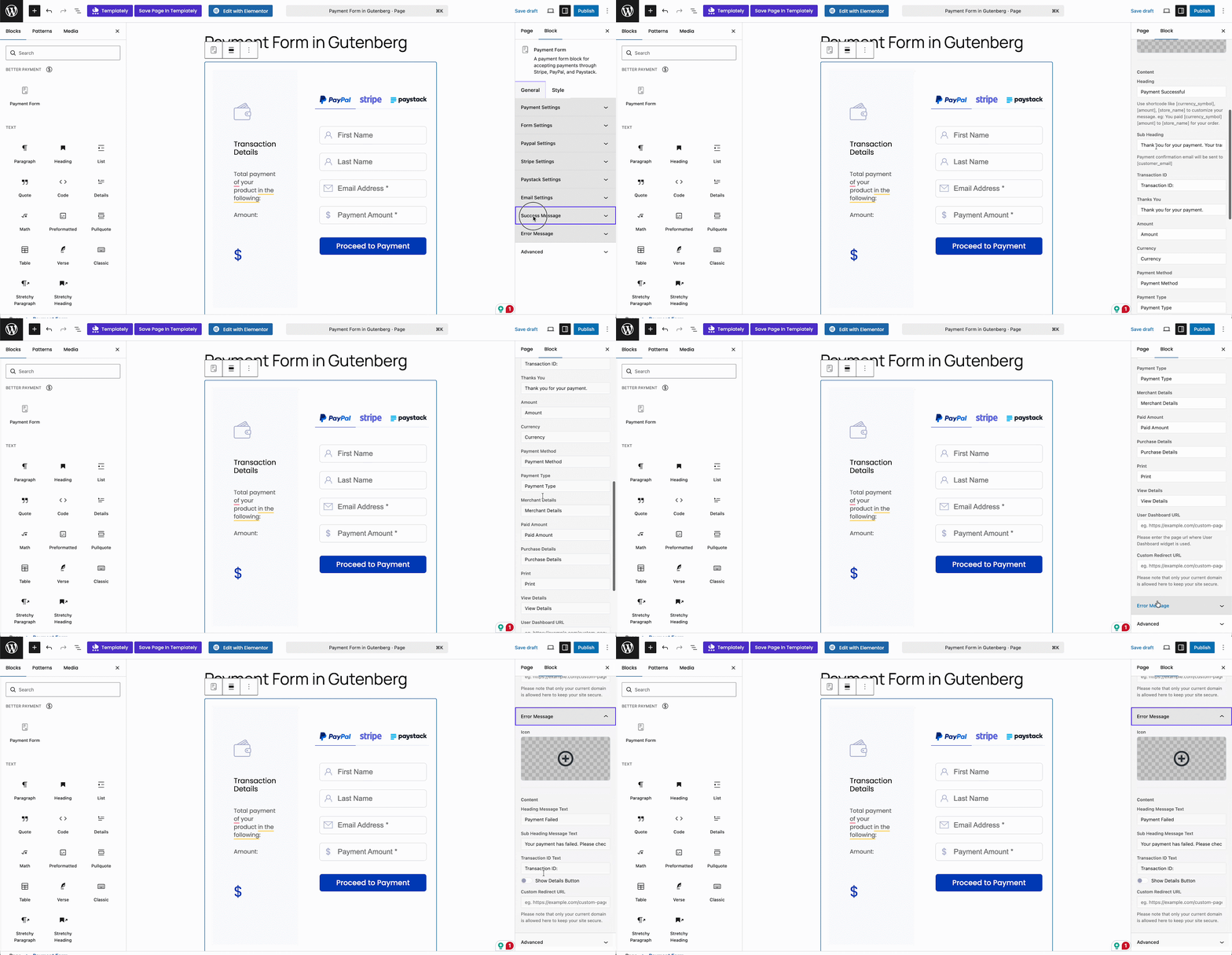
Similarly, you can modify the typography, icons, margins, and background colors within the ‘Error Message’ section to ensure it remains professional and on-brand if a transaction fails.
Step 7: Finalize the Styling & Publish Your Page
One of the main reasons users rely on our Elementor payment widget is the deep styling control, and we have brought that same capability to the native editor. By switching to the ‘Style‘ tab within the block settings, you unlock extensive customization options.
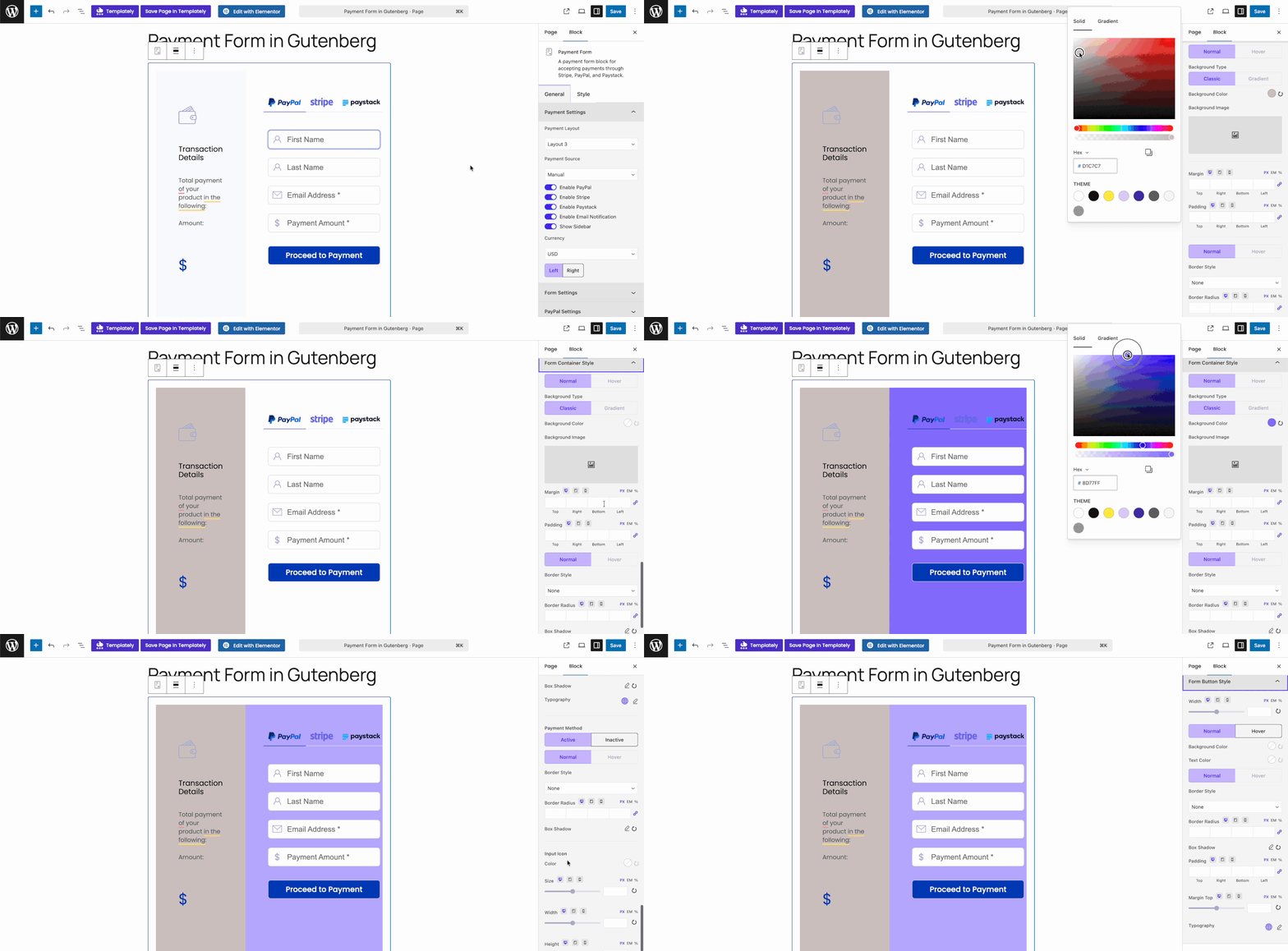
You can fine-tune the form sidebar, adjust text colors and modify container borders. You have complete authority to change the header styles, adjust the form field padding and ensure that every single element of the Gutenberg payment form matches your website’s overall aesthetic perfectly.
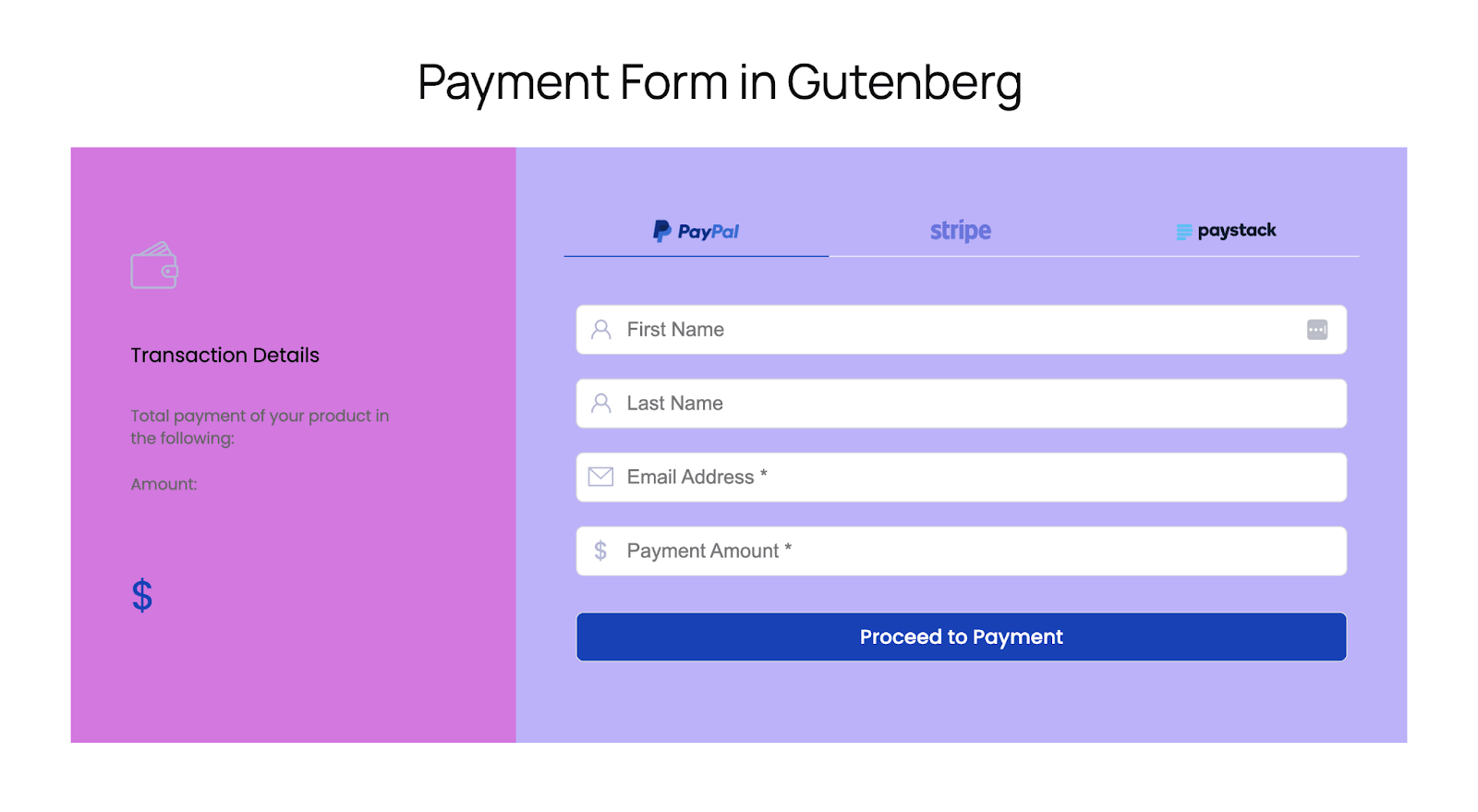
Once you have meticulously configured the settings and applied your custom styles, simply hit publish. Your website is now equipped to process transactions securely and seamlessly through a Gutenberg payment form.
Ready to Transform the Checkout Experience of Your WordPress Site?
Handling digital commerce should not require heavy software. As a dedicated WordPress payment plugin, Better Payment empowers you to build exactly what you need without leaving the default editor. You can now offer a flawless Stripe and PayPal integration, manage complex form fields and output beautifully designed checkouts from one lightweight package.
Do not let a clunky checkout hinder your growth. By utilizing a dedicated Gutenberg payment form, you provide users with the secure, professional experience they deserve. If you are ready to modernize the way you collect payments in WordPress, try Better Payment today. Should you need help configuring your new Gutenberg payment form, our support team is always ready to assist.
If you have found this blog helpful, share your opinion with our Facebook community. You can subscribe to our blogs for valuable tutorials, guides, knowledge, tips, and the latest WordPress updates.